
Fresno Bee News | California
McClatchyNews & Magazines
3.893.00 Reviews
- Version
- 11.1.16
- Installs
- 10.00K
- Age Rating
- Everyone 10+
Screenshots
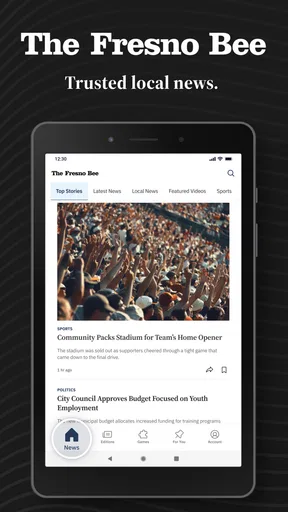
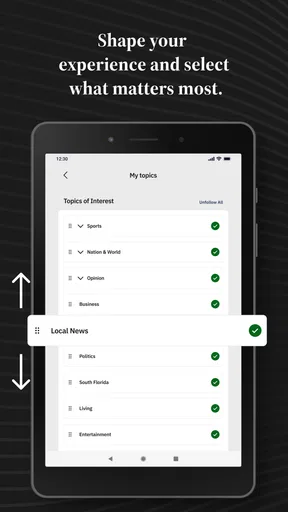
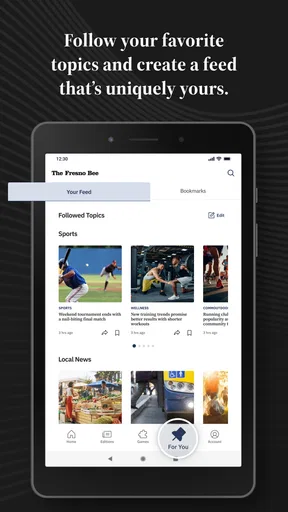
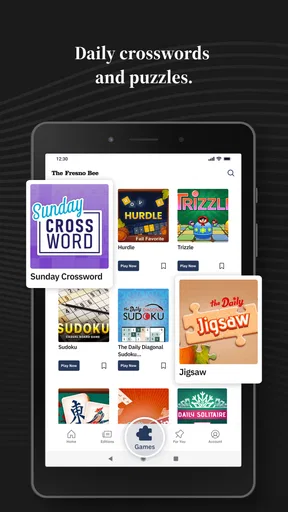
Our Review of Fresno Bee News | California
 Analysis by Appyee
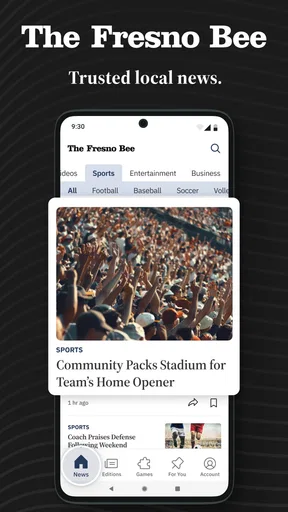
I approached Fresno Bee News as a local-news reader rather than as a general national news app. That distinction matters. Its focus is Fresno and California’s Central Valley, with local reporting alongside weather, politics, and sports. If you live in the area, work there, attend school there, or have family nearby, that narrow focus can be much more useful than a large national feed filled with stories that rarely affect your day.
The app is free to install, although it includes optional in-app purchases ranging from $7.99 to $159.99 per item. It is published by McClatchy and sits in the News & Magazines category. I found its value depends less on how many stories it displays and more on whether local coverage is the kind of information I actually need. For someone checking road-impacting events, local government, high-school or regional sports, and Central Valley weather, the specialization is the main reason to try it.
At the same time, I would not treat it as a complete replacement for every news source. Readers who want worldwide headlines, a broad national politics feed, or a large collection of unrelated topics may feel restricted. My experience with this kind of focused publication app is that the best results come from using it as a local layer in a wider information routine, not expecting it to do everything.
Getting past the first points of friction
The first place I would expect users to get stuck is deciding what the app is supposed to be. The short store description calls it Fresno Bee News, while the broader service is aimed at Fresno and the Central Valley. That means a person downloading it for general California news may find the coverage more regional than expected. Before judging the app, I would give it a fair test using the subjects that matter locally: weather changes, county or city decisions, community events, and nearby sports.
Another common source of confusion is the difference between installing a free app and accessing every part of a newspaper service. The download costs nothing, but the presence of in-app purchases means some reading or account-related choices may involve payment. I would not assume that “free” means every article or service element is unrestricted. If the app presents an offer, I would read the wording carefully, check whether it is optional, and avoid confirming anything until I understand what I am selecting.
This is particularly important for anyone sharing a phone or helping a family member install the app. A quick tap through a purchase screen is easy to misunderstand when the goal was simply to continue reading. I recommend treating the payment stage as a separate decision from installing the app. You can first see whether the local coverage fits your routine, then decide whether any paid option is worthwhile.
The age classification is Everyone 10+, which makes the app broadly suitable for older children and adults, but that label should not be confused with a promise that every news story will feel comfortable for every reader. Local reporting can naturally include serious accidents, crime, political conflict, or difficult community events. I would use the app with younger readers in the same way I would use a newspaper: with some awareness of what they are opening.
Device compatibility is another practical check. The current version is 11.1.16 and requires Android 8.0 or later. If the app does not appear in a store search or refuses to install, I would check the phone’s operating-system version before blaming the application. An older handset can be perfectly usable for many tasks while still falling below an app’s minimum requirement.
A sensible setup routine
My preferred setup is deliberately simple. I would install the app over a stable connection, open it once without rushing through any prompts, and note whether it asks me to sign in, subscribe, or choose a reading path. I would then close and reopen it before relying on it for an important morning update. That small restart test can reveal whether the initial setup completed properly or whether the app needs another attempt.
I would also check the phone’s basic conditions before troubleshooting anything complicated. A nearly full storage drive, an unstable connection, or an operating system that has been left without updates can make an otherwise sound app appear broken. These checks are more useful than immediately reinstalling, because they help identify whether the trouble belongs to the app, the device, or the network.
For a local-news app, location expectations deserve attention too. A reader outside Fresno may still find Central Valley reporting useful, but the app is not designed around that reader’s own neighborhood. If the opening screen feels too narrow, that may be a mismatch of purpose rather than a setup failure. I would compare the first few stories with my actual information needs before changing settings repeatedly.
One useful habit is to decide in advance what “success” looks like. For me, that would mean being able to open the app, find relevant local reporting, check weather or sports coverage, and return later without losing track of the main sections. If it does those things, I would not overreact to a layout choice I personally dislike. A focused publication app should be judged by whether it helps me follow local developments efficiently.
Recovering when reading stops working
If stories stop loading, I would begin with the least disruptive steps. I would move between a reliable Wi-Fi connection and mobile data, then try another page inside the app. If one article fails but other sections open, the problem may be limited to that story or to a temporary connection path. If nothing loads, I would close the app fully and open it again.
When the screen looks stale, I would avoid repeatedly tapping the same control. Instead, I would leave the page, return to the main view, and give the app a moment to refresh. Rapid repeated taps can make it harder to tell whether the application is responding or simply waiting for the network. This is a small point, but it makes troubleshooting much less frustrating.
If reopening does not help, I would restart the phone and check for an available app update. The version number is useful here because it gives me a clear way to see whether I am running the current release rather than relying on memory. I would also check the operating system, since compatibility problems can appear after a phone has been out of date for a long time.
Reinstallation is a later step, not my first one. Before removing the app, I would make sure I know any account details I may need again and understand that local reading preferences could need to be set up another time. Reinstalling can clear damaged local data, but it also removes the convenience of an already configured installation. I would use it when ordinary reopening and device checks have failed.
Payment-related trouble should be handled separately from article-loading trouble. If a page opens but a purchase or subscription prompt behaves unexpectedly, I would stop before confirming the transaction and review the purchase screen. The listed range of $7.99 to $159.99 per item is wide enough that I would never treat an offer as a casual tap-through. A problem with billing is not solved by repeatedly reinstalling a news app.
Building a useful local-news workflow
The strongest way to use this app is to give it a defined role in the day. I would open it during a morning check for Central Valley developments, then return when weather or local sports are more relevant. That approach is better than constantly refreshing a feed without a purpose. It also makes the app’s regional focus feel like an advantage instead of a limitation.
Imagine leaving home in Fresno on a day when weather conditions may affect travel. I would use the app for the local forecast and nearby reporting, then decide whether I need a separate navigation or traffic source for the actual route. The news app can provide context about what is happening in the community, but I would not confuse news coverage with a dedicated live-navigation tool. That distinction prevents disappointment and leads to safer decisions.
For local politics, I would use the app to discover issues and follow developments, but I would still read carefully before forming an opinion. A short headline is useful for triage, not always enough for understanding a complicated city, county, or state decision. My practical tip is to save time for the full article when a story could affect housing, school life, work, or public services. The value of local reporting often appears in the details rather than the headline.
Sports readers can use the same approach. The regional emphasis may be valuable if I care about teams and events connected to the Central Valley, while a national sports app will usually be better for league-wide scores and broad analysis. I would choose the source based on the question I am asking: “What happened near me?” belongs here more naturally than “What happened across every major league?”
One non-obvious trade-off is that a narrow publication can reduce noise while also reducing discovery outside its area. I like not having to sift through endless national headlines to find a local update, but I would pair the app with a broader source if I needed international news or extensive national coverage. That two-source workflow is more efficient than forcing one app to serve incompatible purposes.
Another useful habit is to read the app at two different times before making a judgment. A morning visit may emphasize one set of developments, while an evening visit may reveal updates in sports, public affairs, or community reporting. A single opening can make a local publication seem quiet when the real issue is simply timing. I would evaluate whether it supports my routine over several sessions, not only whether the first screen looks busy.
When the problem is outside the app
Not every disappointing result points to faulty software. News availability can depend on the strength of the connection, the phone’s available storage, the device’s age, and temporary service conditions. If other apps also fail to load, I would investigate the network first. If only this app struggles after a system change, I would check compatibility and updates before assuming the journalism or design is at fault.
There is also a difference between a technical failure and a coverage mismatch. Someone living far from Fresno may open the app and see stories that are accurate but not personally useful. No reset can fix that. The right answer may be a broader California publication, a national news reader, or a local source for the user’s own county. I would recommend this app because of its Central Valley emphasis, not despite it.
Likewise, a reader expecting a completely free newspaper experience may be unhappy when paid options appear. That reaction is understandable, but it is not necessarily evidence that the app is malfunctioning. The sensible response is to distinguish the free installation from optional purchases, read the terms shown on the screen, and decide whether the available access matches the budget and reading habits.
The average rating is 3.8 from around 284 ratings, with 93 written reviews, and the app has reached over 10 thousand installs. I read those figures as a sign of an established but fairly focused product rather than a universal news platform. They can help set expectations, but my own decision would still depend on whether Fresno and Central Valley reporting is valuable to me.
How it compares with familiar alternatives
Compared with a general news aggregator, this app should offer a more local starting point. An aggregator is usually better when I want many publishers, national headlines, international events, and fast topic switching. The trade-off is that local stories can be buried under a much larger volume of content. I would choose the aggregator for breadth and this app for regional attention.
Compared with a weather-only app, Fresno Bee News has a wider purpose. A dedicated weather service is normally the better tool for detailed forecasts, alerts, maps, or frequent condition checks. This app makes more sense when weather is one part of a larger local picture that includes public affairs, community reporting, and sports.
Compared with visiting a newspaper website in a browser, a dedicated app can feel more direct for repeated reading, especially when I already know which publication I want. The browser remains a useful fallback if the app has installation trouble, if I am on an unsupported device, or if I prefer not to maintain another application. I would not install the app simply because it is an app; I would install it if returning to this particular local source is part of my routine.
Compared with social-media feeds, the publication app is a better place to begin when I want organized local reporting rather than a stream shaped by reactions and reposts. Social platforms can surface eyewitness discussion quickly, but they can also mix rumor, commentary, and unrelated material. I would use them as a secondary way to notice what people are discussing, then rely on a local news source for clearer context.
Who will benefit most from it
I think the best audience is people connected to Fresno or the Central Valley who want one recognizable place to check local developments. That includes residents, commuters, parents following community issues, local sports followers, and former residents who still care about what is happening nearby. The app’s value increases when local context matters more than a massive selection of unrelated headlines.
I would also suggest it to readers who feel overwhelmed by broad news feeds. A focused source can make a short reading session more manageable. Instead of spending half an hour filtering national stories, I can concentrate on the region I actually need to understand. The limitation is that I must remember to use another source when my questions extend beyond the app’s geographic emphasis.
I would skip it if my main goal is international news, exhaustive national politics, specialized technology coverage, or highly detailed weather tools. I would also hesitate if I do not have a compatible device running Android 8.0 or later, or if I strongly object to seeing optional purchase choices in a free download. Those are not minor preferences; they shape whether the app will fit comfortably into daily use.
My practical verdict after testing the fit
Fresno Bee News works best as a focused local-news companion. McClatchy’s publication brings together the subjects I would expect to matter to people in Fresno and the Central Valley, including local weather, politics, sports, and community reporting. I appreciate that clear regional identity because it gives the app a purpose that a general feed cannot easily reproduce.
My recommendation comes with a simple condition: install it for local awareness, not for all-purpose news. Start by checking compatibility, use a stable connection, separate article access from purchase decisions, and give the app several reading sessions before deciding whether it belongs in your routine. If a story fails to load, work through connection, restart, update, and device checks before assuming the app itself is responsible.
The free entry point makes it easy to try, while the optional purchases mean I would read every payment screen carefully. The 10+ age classification makes it broadly approachable, but news content still deserves normal parental judgment. Overall, this is a sensible choice when Fresno and Central Valley coverage is the information you actually need. For broader coverage, a national aggregator or another specialized app will be the better companion, but for a regional reader who wants local reporting within easy reach, I would recommend giving it a careful trial.
Verdict
Strengths of Fresno Bee News | California
- Covers local Fresno and Central Valley news in depth.
- Includes breaking updates on California politics, crime, and communities.
- Offers sports coverage focused on regional teams and events.
- Investigative reporting provides useful local context and accountability.
- Digital access makes the newspaper available beyond the printed edition.
Limitations of Fresno Bee News | California
- Some articles may require a subscription or account to access fully.
- Coverage is strongly regional and may feel limited for national news readers.
- Frequent news alerts can become distracting without notification controls.
- The app may use considerable storage for images and cached content.
- Content availability can vary depending on your subscription plan.
Other Releases by McClatchy
View All
Fort Worth Star-Telegram News
News & Magazines3.0

The Charlotte Observer | News
News & Magazines2.7

Sacramento Bee News California
News & Magazines3.1

Kansas City Star | Local News
News & Magazines2.8
Similar Picks in This Category
View All
Google News - Daily Headlines
Google LLC4.0

X
X Corp.4.8

Flipboard:Your Social Magazine
Flipboard3.4

Opera News: breaking & local
Opera4.5

Hindi News by Dainik Bhaskar
Dainik Bhaskar Group4.0

Way2News Daily News App
Way2News ( Formerly Way2SMS )4.6
Frequently Asked Questions
What is Fresno Bee News | California?
Fresno Bee News | California is a news app focused on Fresno, the Central Valley, and broader California coverage. It brings together local reporting, breaking news, politics, crime, sports, business, entertainment, weather, and community stories. It is designed for readers who want to follow developments in the Fresno area from a mobile device rather than relying only on a desktop website or printed newspaper.
Is Fresno Bee News | California free to download and use?
The app can generally be downloaded at no cost, allowing users to install it and explore available content. However, access to every article or premium feature may depend on a subscription, registration, or an active Fresno Bee digital membership. Before subscribing, check the current pricing, trial terms, renewal conditions, and which stories are included, since access policies can change over time.
What type of news and features are available in the app?
Users can typically find local Fresno and Central Valley reporting, California news, sports coverage, weather information, opinion pieces, investigations, and updates about community events. Depending on the version and account status, the app may also include article sharing, saved stories, search tools, personalized alerts, and notifications for breaking news. Feature availability may vary between Android and iOS.
Does the app require an account or subscription?
Some content may be available without signing in, but an account is often required for personalized features, saving articles, managing preferences, or accessing subscriber-only stories. A digital subscription may also be necessary when an article is protected by a paywall. Users should review the sign-in and subscription screens carefully, especially if a free trial automatically changes into a paid plan.
Does Fresno Bee News | California send notifications, and can they be disabled?
The app may request permission to send breaking-news alerts, weather updates, sports notifications, and other editorial messages. Notifications can be useful if you want immediate information about Fresno and California, but they may become frequent depending on your selected topics. You can usually manage them inside the app or through your phone’s notification settings, either disabling them completely or limiting them to important alerts.
